 Ons API
Using Ons API Webhooks in your integration
Ons API Webhooks allow external integrations to receive notifications of events occurring in the Ons Suite.
- Recent changes
- Use cases
- How to use webhooks
- Technical details and examples
Recent changes
CUSTOM events now include event-specific data under payload. Integrations should read custom identifiers from payload; the deprecated top-level custom-event id remains only for backwards compatibility until it is removed after 1 Mar 2027.
Use cases
There are two common use cases in building an integration that can be improved by using Ons API Webhooks:
Maintaining a synchronized dataset for use in your integration
After fetching all data once (using, for example, /v0/xstream/api/employees/data), you can then stay up-to-date
by subscribing to all event types for Employee and processing them as they come in.
Without webhooks, you would have to regularly poll the /v0/xstream/api/employees/updates and
/v0/xstream/api/employees/deletes endpoints, and even when polling at 5 minute intervals you’d still always
be slightly behind.
Responding to events within the Ons Suite.
For example, the next step after an employee creates a Client in Ons might be to perform some action in your integrated system, but this
can only be done once that Client is synchronized.
- Without webhooks, that user will need to wait until the next scheduled synchronization or trigger a manual sync. This is a poor user experience.
- With webhooks, the Client can be synchronized to your integrated system by the time the User has switched.
How to use webhooks
Subscribing
In order to subscribe to webhooks, there are four steps to complete:
- First, generate a secret on the page of your connector (see Image 1). This secret will be used to verify the Hash-based Message Authentication Code (HMAC). How to implement this is described further in authentication
- Make sure that there is a
POSTendpoint, for receiving notifications, available on the webhook URL(s) you will use. This endpoint should respond with a200 OKstatus code in case of a correct HMAC, and a401 UNAUTHORIZEDin case of an incorrect HMAC. To verify this implementation on your endpoint, our service will send 2NOPevents when configuring your URL. One event has a correct HMAC, and one has an incorrect HMAC (see NOP-event). -
In Ons API Dashboard, configure webhook URLs for your integration. You need three URLs, one each for:
development,staging, andproduction. All versions of your connector will make use of these URLs. Any more specific routing will need to be done on the integration side.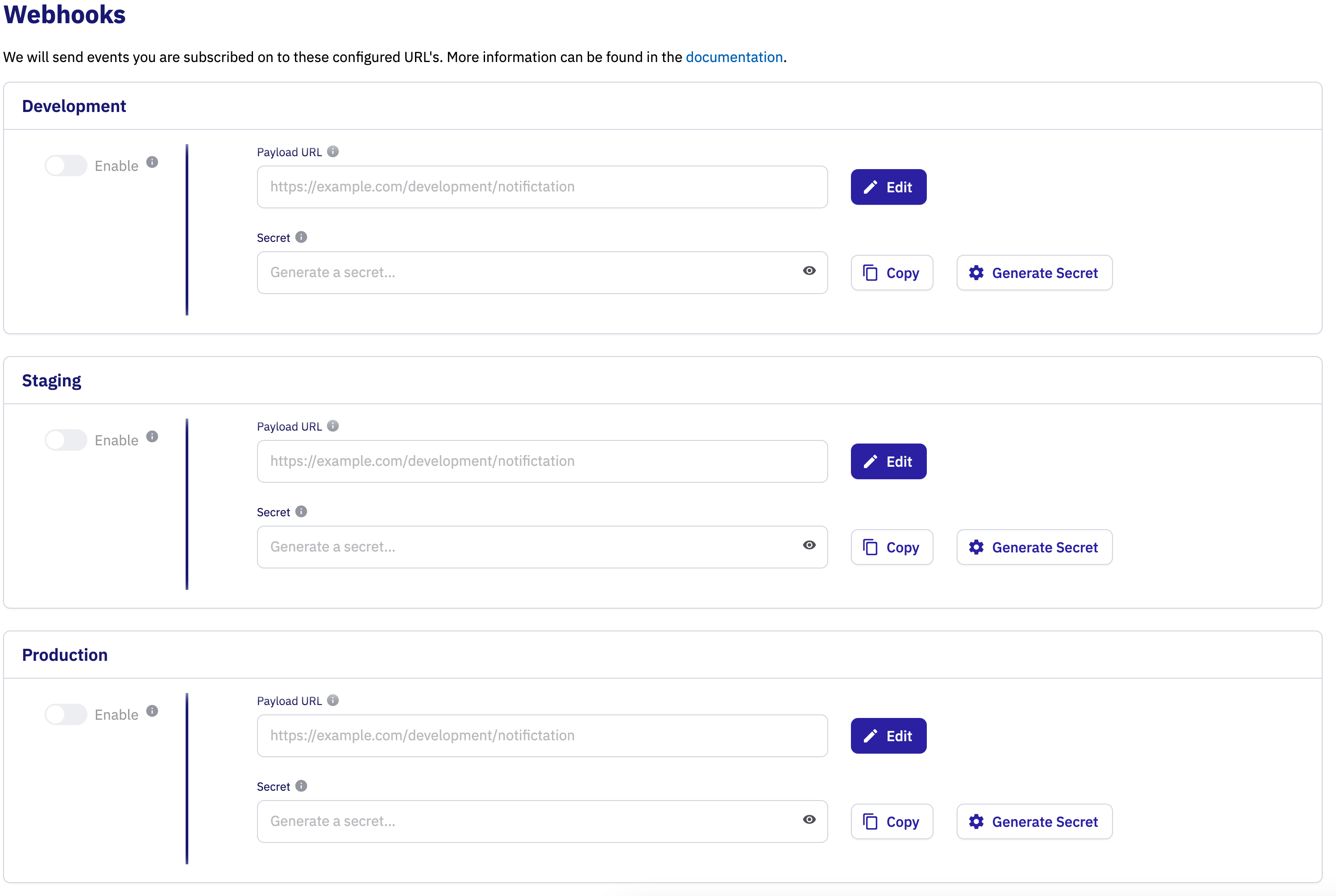 Image 1.
 - In the version that requires webhook subscriptions, select all combinations of
Modeland event types that are of interest to the integration and then save. Your selected webhook subscriptions will be part of the review that is done before promotion to the next stage.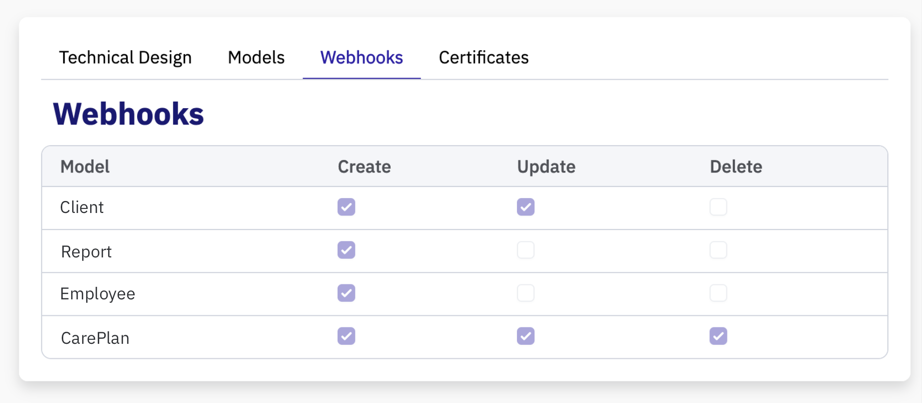 Image 2.
Due to redundancy and caching in our webhook service, it may take up to 5 minutes after saving before you reliably start (or stop) receiving events. You will only receive events from customer environments with approved consent for the connector version and an active certificate covering that environment. A global or connector certificate may cover several environments in its stage.
Handling notifications
The Notification objects posted to your notification endpoint contain enough information to tell you which customer environment is involved,
which event happened, and which follow-up data your integration can use, see notification model.
Your integration will usually need access to APIs that allow fetching related resources by their ID so your integration can fetch them,
inspect them and determine what to do. See the id and payload fields in the notification model for custom-event details.
Technical details and examples
Webhook endpoint
The Ons API Webhook service will POST Notification objects to the configured notification endpoint. Your integration
should accept these requests and respond with a 200 status code to signal the notification was received. Requests
where no connection can be made, or that do not receive a 200 response within 3 seconds will be considered failed
requests.
We suggest you accept requests, store the notification in some sort of queue, respond with a 200 status code and then
handle the request in a different process. This decouples receiving and handling events and prevents you from missing
events when handling slows down temporarily. Plan to receive 100s events / second as traffic may peak in case of: bulk
corrections, imports, on-demand bulk redelivery of failed notifications, or catch-up after downtime.
Authentication
- Our service will authenticate itself by use of an HTTP-header named
X-Signature-SHA512. This header is an HMAC (Hash-based message authentication code) that is generated by hashing the secret with the request payload using the SHA512 algorithm. The secret can be generated in the page of the connector. - In case of a correct HMAC our service expects a response with a
200 OKstatus code. In case of an incorrect HMAC our service expects a response with a401 UNAUTHORIZEDstatus code. When configuring your URL, our service will verify this implementation with a NOP-event - We expect your server to use HTTPS.
This is how the HMAC can be generated in Java:
import javax.crypto.Mac;
import javax.crypto.spec.SecretKeySpec;
import java.security.InvalidKeyException;
import java.security.NoSuchAlgorithmException;

public class SignatureGenerator {

    private static final String ALGORITHM = "HmacSHA512";

    public static String generateSignature(String data, String secret) throws NoSuchAlgorithmException, InvalidKeyException {
        Mac mac = Mac.getInstance(ALGORITHM);

        SecretKeySpec secretKeySpec = new SecretKeySpec(secret.getBytes(), ALGORITHM);

        mac.init(secretKeySpec);

        byte[] macBytes = mac.doFinal(data.getBytes());

        return toHexString(macBytes);
    }

    private static String toHexString(byte[] bytes) {
        StringBuilder hexString = new StringBuilder();
        for (byte b : bytes) {
            String hex = String.format("%02x", b);
            hexString.append(hex);
        }
        return hexString.toString();
    }

    public static void main(String[] args) {
        try {
            String data = "{\"customerCode\":\"TE1000\",\"modelType\":\"client\",\"eventType\":\"CREATE\",\"id\":1,\"timestamp\":\"2024-08-22T10:08:11+02:00\",\"amountOfRetries\":0}";
            String secret = "SuperSecret";
            String signature = generateSignature(data, secret);
            System.out.println("Signature: " + signature);
        } catch (NoSuchAlgorithmException | InvalidKeyException e) {
            e.printStackTrace();
        }
    }
}
Notification model
Notification objects will look like this:
{
  "customerCode": "TE1002",
  "modelType": "client",
  "eventType": "CREATE",
  "id": 1234,
  "timestamp": "2024-08-22T10:08:11+02:00",
  "amountOfRetries": 0
}
customerCodeidentifies the customer environment. For a global or connector certificate, send this value asX-Customer-Codein API requests; an environment certificate includes it in its common name.modelTypewill indicate the model.eventTypethe type of action (CREATE,UPDATE,DELETE,CUSTOM,NOP) that triggered the event.idthe id of the model. This field is always present forCREATE,UPDATE, andDELETEevents. ForCUSTOMevents, this top-levelidis deprecated and will be removed after 1 Mar 2027. Until then, it is only present whenpayloadcontains exactly one top-level field whose name ends withid, case-insensitive, and whose value is an integral JSON number that fits in a signed 64-bit integer (Long). It is omitted for string identifiers, decimal identifiers, multiple id-like fields, payloads without an id-like field, and out-of-range numbers; those values remain inpayload.payloadcontains custom event data forCUSTOMevents.timestampwhen the event was triggered.amountOfRetrieshow often delivery of the event has been attempted.
Available modelType’s en eventType’s will be expanded over time, but you will never receive events you are not subscribed on.
NOP event
A NOP event is short for “no operation” event. When receiving a NOP event, only the HMAC has to be verified. Respond with either a 200 or 401 status code based on the HMAC validation result. NOP events can be ignored (they are only used to validate your HMAC implementation).
Supported Events
CREATE, UPDATE, DELETE Events
| EventType | ModelType | Description |
|---|---|---|
| client | CREATE, UPDATE, DELETE | When creating, updating or deleting a client. |
| client_address | CREATE, UPDATE, DELETE | When creating, updating or deleting a coupling between a client and address. |
| client_contact_relation | CREATE, UPDATE, DELETE | When creating, updating or deleting a relation between a client and contact. |
| insurance | CREATE, UPDATE, DELETE | When creating, updating or deleting an insurance. |
| client_contact_relation_address | CREATE, UPDATE, DELETE | When creating, updating or deleting an address of a contact that has a relation with a client. |
| location_assignment | CREATE, UPDATE, DELETE | When creating, updating or deleting a coupling between a location and client. |
| report | CREATE, UPDATE, DELETE | When creating, updating or deleting a report. |
| employee | CREATE, UPDATE, DELETE | When creating, updating or deleting an employee. |
| hour_type | CREATE, UPDATE | When creating or updating an hour type. |
| location | CREATE, UPDATE, DELETE | When creating, updating or deleting a location. |
| team | CREATE, UPDATE, DELETE | When creating, updating or deleting a team. |
| user | CREATE, UPDATE, DELETE | When creating, updating or deleting a user. |
| address | CREATE, UPDATE, DELETE | When creating, updating or deleting an address. |
| employee_address | CREATE, UPDATE, DELETE | When creating, updating or deleting a coupling between an employee and address. |
| expertise_profile | CREATE, UPDATE | When creating or updating an expertise profile. |
| contract | CREATE, UPDATE, DELETE | When creating, updating or deleting a contract of an employee. |
| care_plan | CREATE, UPDATE, DELETE | When creating, updating or deleting a care plan. |
| team_assignment | CREATE, UPDATE, DELETE | When creating, updating or deleting a coupling between an employee and team. |
| care_allocation | CREATE, UPDATE, DELETE | When creating, updating or deleting the care allocation of a client. |
| client_employee_relation | CREATE, UPDATE, DELETE | When creating, updating or deleting a relation between a client and employee. |
CUSTOM Events
We also support several events that are not a CREATE/UPDATE/DELETE of a single record but refer to a specific action. Custom event data is available under payload; integrations that currently read a top-level custom-event id should migrate to the corresponding field inside payload. The top-level custom-event id is deprecated and will be removed after 1 Mar 2027.
For example, a care_tech_order_created notification can look like this while the deprecated top-level custom-event id is still present:
{
  "customerCode": "TE1002",
  "modelType": "care_tech_order_created",
  "eventType": "CUSTOM",
  "id": 10,
  "payload": {
    "orderId": 10,
    "productCode": "N-0001"
  },
  "timestamp": "2024-08-22T10:08:11+02:00",
  "amountOfRetries": 0
}
| ModelType | EventType | Description | Payload contains |
|---|---|---|---|
| external_care_providers_changed | CUSTOM | When the external care providers of a client change; clientId identifies that client. |
clientId |
| client_employee_relations_changed | CUSTOM | When the employee relations of a client change; clientId identifies that client. |
clientId |
| team_assignment_changed | CUSTOM | When an employee changes team; employeeId identifies that employee. |
employeeId |
| care_plan_activated | CUSTOM | When a client’s care plan is activated; clientId identifies that client. |
clientId |
| client_careallocations_changed | CUSTOM | When a client’s care allocation changes; clientId identifies that client. |
clientId |
| employee_schedule_changed | CUSTOM | When an employee’s roster or planning changes in Ons Planning; employeeId identifies the employee, from and to delimit the affected period, date is a changed day, and source is the source of the change: availability (availability), shift_assignment (shift assignment), location_authorization (location authorization, without date), or plan_mutation (a planning change from Ons Vandaag, such as a change to the duration or start time of a visit). |
employeeId, from, to, date, source |
| client_schedule_changed | CUSTOM | When a client’s planning changes in Ons Planning; clientId identifies the client, date is a changed day, and source is the cause of the change: shift_assignment (assignment to a shift with visits to the client), plan_card (scheduling, moving, or changing a visit), or plan_mutation (a planning change from Ons Vandaag that changes a visit to the client, including when only its start time shifts due to an earlier visit). |
clientId, date, source |
| care_tech_order_created | CUSTOM | When a care technology order is created; orderId identifies the order and productCode the ordered product. |
orderId, productCode |
| roster_slot_changed | CUSTOM | When a shift assignment, flex request, or flex signup changes a roster slot in Ons Planning; rosterSlotId identifies the shift slot and date, order its position, source the cause, and action (CREATE, UPDATE, or DELETE) the change. |
rosterSlotId, order, source, action |
| medication_administration_changed | CUSTOM | When a medication administration on a medication chart dated today or earlier is registered or changed in Ons Medicatie; id identifies the administration (fetch it with getMedicationAdministration), clientId and medicationChartDate identify the client and the day of the administration (fetch all administrations of that day with getMedicationAdministrations), and action is CREATE when a care professional registered an as-needed administration or UPDATE when a scheduled administration changed. |
id, clientId, medicationChartDate, action |
Delivery order
We cannot guarantee notifications are delivered in the order they are triggered. This means that you may see an UPDATE
notification for a client for which you have not seen the CREATE yet. Design your integration to be able to handle
situations like this. This can occur because our webhook service is deployed with multiple instances that prefetch
notifications in batches, and because delivery for a single notification may fail and the retry might place it after
another notification for the same record for which delivery succeeded. For example:
10:00:00 CREATE CLIENT 1  <- Delivery of this notification fails
10:00:05 UPDATE CLIENT 1  <- Delivery of this notification succeeds
10:01:00 CREATE CLIENT 1  <- Re-delivery of the notification succeeds this time
Failed delivery attempts
Requests that are not answered with a 200 status code within 3 seconds will be considered failed requests. Delivery will
not be retried automatically. We will store events for which delivery has failed for 24 hours and then discard them.
We can store up to 1.000.000 events, after that events will start to overflow and will be lost.
Your integration can request re-delivery of failed notifications by sending a PUT request with empty body to /webhooks/redeliver.
You can trigger a retry per stage (development, staging, production) for missed notifications for that connector. Use an environment certificate for this request; global and connector certificates are not supported for redelivery.
Plan for resynchronization
Failed deliveries of Ons API Webhook notifications will be stored for 24 hours and are available for retry during that period. If your webhook endpoint is down for longer than that period, the missed notifications are lost. We suggest you design an option for resynchronization in case that happens.
Event loops
If you respond to a notification by updating the record in Ons that you received the notification for, you’ll receive another event for that same record. If that second event triggers another update from your integration, you may cause an event loop. Examples of two situations causing an event loop below.
Example of an event loop with a single integration
As an example of how things can go wrong, assume you’ve implemented an automatic spelling corrector that responds
to notifications about the creation or update of a Report and saves the Report again with corrected spelling. What
can happen if you save the Report without checking whether anything changed:
- Event received for
Report1234 - Fetch
Report1234 - Fix spelling
PUTReport1234(regardless of whether anything changed about the model)- Return to 1
You can break this loop by detecting that your integration changed nothing about the Report and not saving it.
With multiple integrations
Building on the example above. Even if your integration is aware of notifications created by its own actions, two integrations may trigger each other. Imagine two spell checker integrations, that do not cause event loops on their own, with slightly different spelling rules:
- Both integrations receive
CREATEevent forReport1234 - Both integrations do their spelling check
- Integration A makes no changes and does not update the
Report - Integration B makes some changes and updates the
Report
- Integration A makes no changes and does not update the
- Both integrations receive
UPDATEevent forReport1234- Integration A makes changes, and updates the
Report - Integration B makes no changes and does not update the
Report
- Integration A makes changes, and updates the
- Both integrations receive
UPDATEevent forReport1234- Integration A makes no changes and does not update the
Report - Integration B makes changes and updates the
Report
- Integration A makes no changes and does not update the
- Return to 3
This loop is a bit harder to break, since something has changed since last time your integration saved the record. We suggest implementing a check to make sure that you’re not repeatedly editing the same record.
Open API specification
Your webhooks endpoint should conform to this specification. You can configure your own path. Download the raw specification here.